Something quiet is happening across the American economy. Law offices in New Jersey, dental clinics in Texas, real estate brokerages in California – thousands of small businesses are making the same move. They are cutting front-desk phone costs and switching to automated phone answering services to handle what a traditional receptionist once did. And the results speak for themselves.
This is not about eliminating jobs or cutting corners. This is a smart, forward-thinking business decision – one that protects revenue, improves customer experience, and positions small businesses to compete at a much higher level. Here’s what’s behind the shift, and what it could mean for your business.
The Real Cost of a Human Receptionist

Let’s be honest about the numbers. A full-time receptionist in the United States typically costs between $35,000 and $45,000 per year in salary alone – before benefits, paid leave, training, and turnover expenses are factored in. They work 8–9 hours a day, five days a week. That’s it.
Your customers, however, do not follow that schedule. They call at 7 PM on a Tuesday. They call on Saturday afternoons. They call during your team’s busiest hour, when every line is occupied. And here’s the part that matters most: over 85% of callers who can’t get through on their first attempt will not call back. They simply move on to the next business that picks up.
An automated phone answering service doesn’t take sick days. It doesn’t go on vacation. It answers every single call, every single time – whether it’s 10 AM on a Monday or midnight on New Year’s Eve.
What “Automated” Really Means in 2026
Most people still picture a robotic voice reading a script when they hear the term automated phone system. That was the reality a decade ago. In 2026, it’s a completely different story.
Today’s AI-powered automated answering services use advanced natural language processing (NLP) to understand what callers are saying — in their own words and tone — and respond with the accuracy and warmth you’d expect from a well-trained team member.
When a customer calls through Automation Expert’s automated answering service, the system can greet them by name if they’re a returning customer, answer their question accurately, book an appointment directly into your calendar, route urgent calls to the right person, and generate a full post-call summary for your records — all without a single second of hold music or dropped context.
This is what makes the technology genuinely valuable for small business phone automation. It’s not just about picking up calls. It’s about doing something useful with every single one.
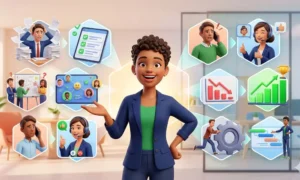
Five Business Problems It Solves – Immediately
1. After-Hours Lead Loss
A prospect calls at 8:30 PM asking about your pricing. Without an automated phone answering service, they hear a voicemail and hang up. With one, they get a real answer – and potentially book a consultation on the spot. Small businesses that deploy after-hours call automation consistently report meaningful improvements in lead capture and conversion rates.
2. Overflow During Peak Hours
Mondays are brutal for most service businesses. Calls pile up simultaneously. An automated telephone answering service handles unlimited concurrent calls – meaning your customers never hear a busy signal, no matter how heavy the volume gets.
3. High Volume of Repetitive Questions
Studies show that 60–70% of inbound calls to small businesses ask the same 5–10 questions: business hours, location, pricing, appointment availability, and service status. Automating these routine interactions frees your human team to focus on higher-value conversations that actually require their attention.
4. Inconsistent Customer Experience
Human receptionists have good days and bad days. An automated answering service for small business delivers the same professional, friendly, branded experience every single time – whether it’s a routine inquiry at 10 AM or an after-hours callback request at 11 PM.
5. Scalability Without Additional Headcount
Growing fast? You don’t need to hire a second or third receptionist to keep up. Your automated phone answering system scales with you instantly – handling 10 calls or 1,000 with the same efficiency and zero additional cost per hire.
Why US Businesses Are Making the Switch Right Now

Customer experience in the US operates under a unique set of rules. American consumers expect fast, responsive, always-on service — and the bar has never been higher. A 2024 Salesforce survey found that 88% of US customers believe the experience a company provides is just as important as its products and services.
At the same time, small businesses are being squeezed on every side. Labor costs have risen sharply. Front-desk staff are harder to hire and even harder to retain. An automated answering service for business bridges this gap, allowing small teams to deliver the kind of enterprise-grade customer communication that was previously accessible only to larger companies with large call-center budgets.
Industries leading this shift across the US include healthcare clinics, legal practices, real estate agencies, home services companies (HVAC, plumbing, cleaning), and e-commerce customer support teams.
What to Look for in an Automated Answering Service
Not all automated phone answering services are built equally. When evaluating your options, US small businesses should prioritize the following capabilities:
- Natural Language Processing (NLP): Can the system understand a caller who doesn’t follow a fixed script or menu?
- CRM and Calendar Integration: Does it sync seamlessly with your existing tools — Google Calendar, Salesforce, HubSpot, GoHighLevel, or Zoho?
- Custom Call Flows: Can you build scripts that reflect your unique brand voice and industry-specific needs?
- HIPAA Compliance: Non-negotiable for any healthcare practice handling patient information over the phone.
- Intelligent Call Escalation: Can the system recognize when a caller needs a live person and transfer them smoothly – without losing context?
Automation Expert’s automated answering service is built to meet every one of these requirements. Their team deploys fully customized solutions across healthcare, real estate, legal, and home services – with US-based automation consultants who manage the entire setup on your behalf.
Making the Switch: Easier Than You Think
The barrier to switching is far lower than most business owners expect. A modern automated phone answering service works with your existing phone number through simple call forwarding — no new hardware, no long implementation timelines, no IT department required.
With a managed solution like Automation Expert, most businesses are live within 3–5 business days. Call flow design, CRM integration, script building, and pre-launch testing are all handled by the implementation team. You focus on running your business. They handle everything else.
If cost, complexity, or the concern about losing a human touch has kept you on the fence, 2026 is the year to take a serious look. The technology has matured significantly. The ROI is measurable and fast. And your customers – who already interact with AI every day through apps, search engines, and smart assistants – are more ready for it than you might think.
The businesses winning in today’s US market are not always the ones with the largest teams. They’re the ones with the smartest systems.